> For the complete documentation index, see [llms.txt](https://docs.geoprismregistry.com/llms.txt). Markdown versions of documentation pages are available by appending `.md` to page URLs; this page is available as [Markdown](https://docs.geoprismregistry.com/version/v2.0.0/external-system-integration/synchronize-an-external-system/fhir-synchronization.md).

# FHIR Synchronization

{% hint style="info" %}
A registered [FHIR external system](/version/v2.0.0/external-system-integration/register-an-external-system/fhir-external-system.md) must exist in Geoprism Registry.
{% endhint %}

A FHIR synchronization either sends data to a FHIR server (**Export**) or pulls data from one (**Import**). One synchronization can't do both, so create a separate configuration for each direction.

## Sending data to a FHIR server

1. Go to the **Settings** page. In the **External System Synchronizations** section, click **Register Synchronization**.
2. On the **Synchronization Configurations** page, click **Create**.

   <figure><img src="https://lh4.googleusercontent.com/266T4bH2_5Q0C-oJ1VxvtdZIwrlnZM750n0HvEVnddkht0vxVNv4k9bB9KlynvGxsSERlUUUeQQ-SGAIu7UPj75ceWZelha7PrMPFF25YTiIEsHyecXZ1OLfyBVb4Dhc1WMaBdHK9aZpZpSh0kkQ2xZycnOmRF25kEiG7z7kFvZxr2DclU8x_A9Fxg" alt=""><figcaption></figcaption></figure>
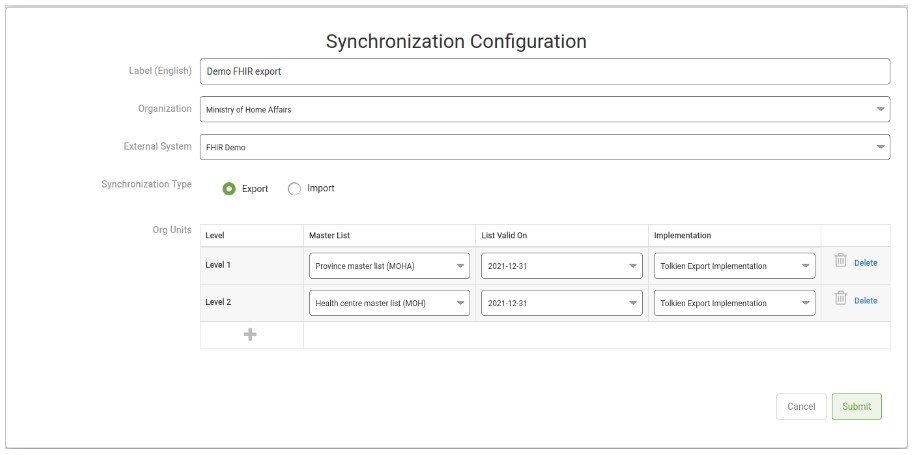
3. Fill out the **Synchronization Configuration** form, selecting **Export** as the **Synchronization Type**:

   <figure><img src="https://3732932512-files.gitbook.io/~/files/v0/b/gitbook-x-prod.appspot.com/o/spaces%2F9giVyCrmTxAs33YrSRbJ%2Fuploads%2Fgit-blob-e5f331e2fc6ec20fc6e0ccd0e6cc67c9b09af42b%2FScreenshot%202022-11-01%20134209.jpg?alt=media" alt=""><figcaption></figcaption></figure>

   | Field                | Description                                                                                                                                                                                                                                                                                                                                                                                                                                                                                                                                                                                                                                                                                                                | Required |
   | -------------------- | -------------------------------------------------------------------------------------------------------------------------------------------------------------------------------------------------------------------------------------------------------------------------------------------------------------------------------------------------------------------------------------------------------------------------------------------------------------------------------------------------------------------------------------------------------------------------------------------------------------------------------------------------------------------------------------------------------------------------- | -------- |
   | Label                | The label of the synchronization configuration.                                                                                                                                                                                                                                                                                                                                                                                                                                                                                                                                                                                                                                                                            | Required |
   | Organization         | The organization the configuration is available to. It can't be changed later.                                                                                                                                                                                                                                                                                                                                                                                                                                                                                                                                                                                                                                             | Required |
   | External System      | The registered FHIR external system to send data to. It can't be changed later.                                                                                                                                                                                                                                                                                                                                                                                                                                                                                                                                                                                                                                            | Required |
   | Synchronization Type | **Export**                                                                                                                                                                                                                                                                                                                                                                                                                                                                                                                                                                                                                                                                                                                 | Required |
   | Levels               | <p>The data to send, one level at a time. For each level, choose:</p><ul><li><strong>Master List:</strong> the list to send, from <a href="/version/v2.0.0/explore/lists-and-spatial-data.md">Lists and Spatial Data</a>.</li><li><strong>List Valid For:</strong> the version of that list.</li><li><strong>Implementation:</strong> the code that converts the data to FHIR resources. See <a href="/version/v2.0.0/deployment-and-setup/fhir-custom-implementation.md">FHIR custom implementation</a>.</li></ul><p>Click the plus icon (<strong>Add new level</strong>) to add another level, or <strong>Delete</strong> to remove one. This section is labelled <strong>Org Units</strong> in the current version.</p> | Required |
4. Click **Submit**.

## Pulling data from a FHIR server

{% hint style="danger" %}
Pulling data from a FHIR server requires a custom implementation, installed on your Geoprism Registry instance, that defines how the data is brought in. Contact your System Administrator for more information. System Administrators can see [FHIR custom implementation](/version/v2.0.0/deployment-and-setup/fhir-custom-implementation.md) for how to set one up.
{% endhint %}

1. Go to the **Settings** page. In the **External System Synchronizations** section, click **Register Synchronization**.
2. On the **Synchronization Configurations** page, click **Create**.

   <figure><img src="https://lh4.googleusercontent.com/266T4bH2_5Q0C-oJ1VxvtdZIwrlnZM750n0HvEVnddkht0vxVNv4k9bB9KlynvGxsSERlUUUeQQ-SGAIu7UPj75ceWZelha7PrMPFF25YTiIEsHyecXZ1OLfyBVb4Dhc1WMaBdHK9aZpZpSh0kkQ2xZycnOmRF25kEiG7z7kFvZxr2DclU8x_A9Fxg" alt=""><figcaption></figcaption></figure>
3. Fill out the form, selecting **Import** as the **Synchronization Type**:

   | Field                | Description                                                                             | Required |
   | -------------------- | --------------------------------------------------------------------------------------- | -------- |
   | Label                | The label of the synchronization configuration.                                         | Required |
   | Organization         | The organization the configuration is available to. It can't be changed later.          | Required |
   | External System      | The registered FHIR external system to pull data from. It can't be changed later.       | Required |
   | Synchronization Type | **Import**                                                                              | Required |
   | Implementation       | The custom implementation that defines how FHIR data is brought into Geoprism Registry. | Required |

   <figure><img src="https://lh5.googleusercontent.com/exnu4HLjcpICJ4BE2i5AbridnGwmjkNmnrnr215Q60CB8oh3_Tc7iXgBKhRgtmFhli_5BVdDLN1_ZCrTDBL-hm5RGwUSeSTLlEP-L50gP3H80Gjg1_W_88I2TNuXW_RLv5s92K31PAGePNMdcIsJ2Sm5Jly0sbqIgolm1QrZ8ZJkkHSuXZu9Bss8sA" alt=""><figcaption></figcaption></figure>
4. Click **Submit**.

## Running a synchronization

1. On the **Synchronization Configurations** page, click **View** next to the FHIR configuration.

   <figure><img src="https://3732932512-files.gitbook.io/~/files/v0/b/gitbook-x-prod.appspot.com/o/spaces%2F9giVyCrmTxAs33YrSRbJ%2Fuploads%2FKO2nDToM2YAIbqyPtpDL%2Fimage.png?alt=media&amp;token=fe5d9b35-3e27-4323-b54a-fccb6a3d9fe9" alt=""><figcaption></figcaption></figure>
2. Click **Run now** to start a synchronization job. Its progress and any errors appear under **Jobs**.

For an export, you can also click **Generate Bundle** to download a JSON bundle of the data that would be sent.