> For the complete documentation index, see [llms.txt](https://docs.geoprismregistry.com/llms.txt). Markdown versions of documentation pages are available by appending `.md` to page URLs; this page is available as [Markdown](https://docs.geoprismregistry.com/version/v2.0.0/external-system-integration/register-an-external-system/fhir-external-system.md).
# FHIR External System
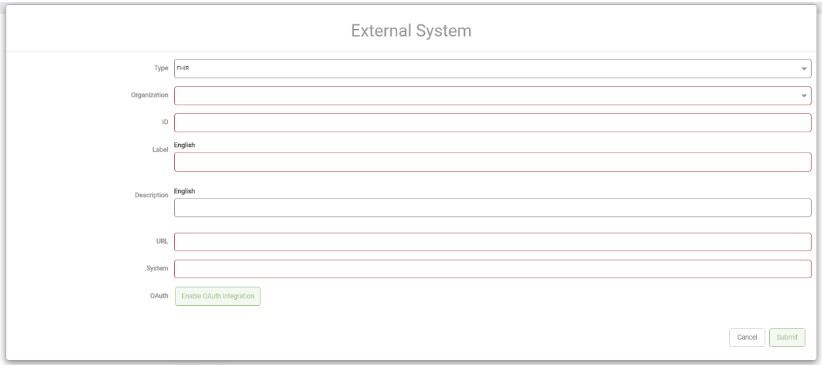
A FHIR external system connects Geoprism Registry to a FHIR server. Geoprism Registry stores both its own identifier and the external system's identifier for each object, so it can keep track of which records match in the two systems. External identifiers are set when you import data.
1. Go to the **Settings** page from the sidebar.

2. In the **External Systems** section, click the plus icon to open the **External System** form.
3. Select **FHIR** as the **Type** and fill out the form:
| Field | Description | Required |
| ------------ | --------------------------------------------------------------------------------------------------------------------------------------------------------------------------------------------------------------------------------------------- | -------- |
| Type | The type of external system. It can't be changed later. | Required |
| Organization | The organization the external system is available to. It can't be changed later. | Required |
| ID | The identifier of the external system. It can't be changed later. | Required |
| Label | The display label, with one field per installed locale. | Required |
| Description | A description, with one field per installed locale. | |
| URL | The URL of the FHIR server, including the port, for example `https://fhir.example.com:443`. | Required |
| System | The FHIR system to use when exporting or importing. | Required |
| OAuth | Click **Enable OAuth Integration** and enter the **Username** and **Password**, then the OAuth **Client Id**, **Secret Key**, **Profile Location**, **Token Location** and **Authorization Location** from your FHIR server's OAuth settings. | |
4. Click **Submit**.
## Compatibility
Integration with FHIR requires FHIR OAuth security integration. Not all versions of [HAPI FHIR](https://hapifhir.io/) are known to work with Geoprism Registry through OAuth. These versions have been tested:
| HAPI FHIR version | Integration via OAuth possible? |
| ----------------- | ------------------------------- |
| 5.3.0 | Yes |
## Synchronization
To send data to a FHIR server, or pull data from one, see [FHIR Synchronization](/version/v2.0.0/external-system-integration/synchronize-an-external-system/fhir-synchronization.md).