> For the complete documentation index, see [llms.txt](https://docs.geoprismregistry.com/llms.txt). Markdown versions of documentation pages are available by appending `.md` to page URLs; this page is available as [Markdown](https://docs.geoprismregistry.com/version/v2.0.0/explore/lists-and-spatial-data/exporting-lists-and-spatial-data.md).
# Exporting Lists and Spatial Data
{% hint style="info" %}
Registry Administrators, Registry Maintainers and Registry Contributors can export the lists and spatial data for the Geo-Object Types in their organization, and for lists and spatial data from other organizations that are **Public**.
{% endhint %}
You can export a list as a spreadsheet, or its spatial data as a shapefile.
1. Navigate to the **Lists and Spatial Data** page from the sidebar. On the left, click the Geo-Object Type under its organization, then click the title of the set.
2. In the date or period you want, open the **List** of the working version or a published version.
3. Optionally, filter the list. Only the rows that match your filters are exported, and the button changes to **Export filtered list**. Invalid Geo-Objects are only included if **Also Show Invalid Geo-Objects** is selected.
4. Click **Export**.
5. In the **Export** window, choose **List (spreadsheet)** or **Spatial data (shapefile)**. For a Geo-Object Type with mixed geometries, also choose the **Geometry Type** to export. Then click **Submit**.
6. The file downloads to your computer.
## What the files contain
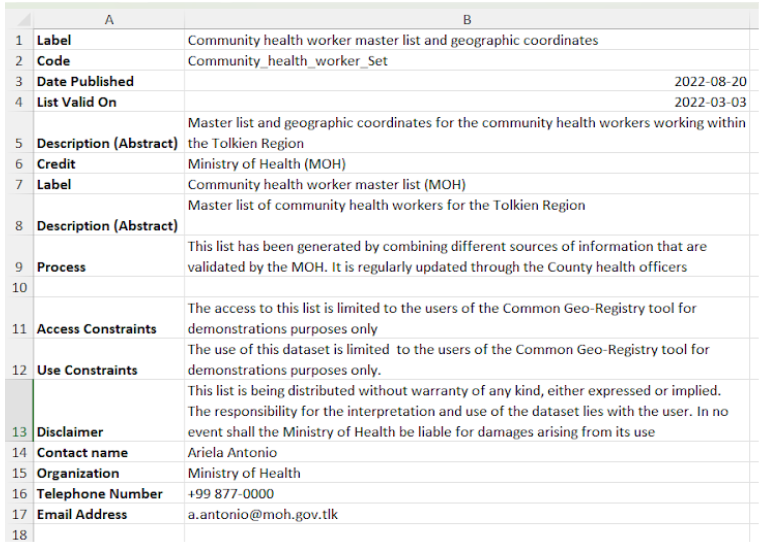
**List (spreadsheet):** an XLSX file with three worksheets:
1. The list of Geo-Objects, as it appears in Geoprism Registry.
2. **Metadata**, the list's metadata.
3. **Data Dictionary**, which describes each column.
For a **Private** list, people outside the organization only get the code and label columns.
**Spatial data (shapefile):** a ZIP file containing the files that make up the shapefile, and a metadata spreadsheet with **Metadata** and **Data Dictionary** worksheets built from the spatial data's metadata. Open the shapefile in your GIS software. Shapefile field names are shortened because of the format's length limit, so use the **Data Dictionary** to see what each field is.