> For the complete documentation index, see [llms.txt](https://docs.geoprismregistry.com/llms.txt). Markdown versions of documentation pages are available by appending `.md` to page URLs; this page is available as [Markdown](https://docs.geoprismregistry.com/version/v2.0.0/explore/explorer/editing-a-geo-object.md).

# Editing a Geo-Object

{% hint style="info" %}
The System Administrator, Registry Administrators and Registry Maintainers can edit Geo-Objects directly. Registry Contributors' edits are submitted as change requests.
{% endhint %}

1. Select the Geo-Object and click **Edit** in the Attribute Panel.

   <figure><img src="https://3732932512-files.gitbook.io/~/files/v0/b/gitbook-x-prod.appspot.com/o/spaces%2F9giVyCrmTxAs33YrSRbJ%2Fuploads%2F034863B4icRVZLgUbYKW%2Fimage.png?alt=media&amp;token=1add21b6-9a15-46b2-b949-0e404cc3d5c9" alt=""><figcaption></figcaption></figure>
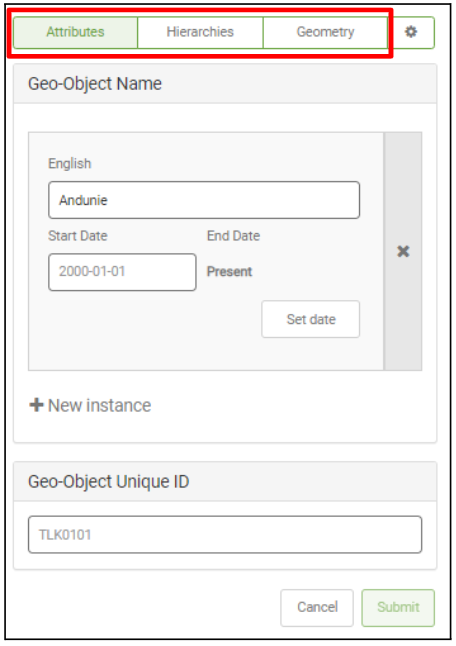
2. Click the tab with the information you want to change: **Attributes**, **Hierarchies**, **Geometry** or the gear tab.

   <figure><img src="https://3732932512-files.gitbook.io/~/files/v0/b/gitbook-x-prod.appspot.com/o/spaces%2F9giVyCrmTxAs33YrSRbJ%2Fuploads%2FlFh9vOUhvxhe1HugqBto%2Fimage.png?alt=media&amp;token=7fb2b8ff-6011-455d-9591-824e86f531e0" alt=""><figcaption></figcaption></figure>
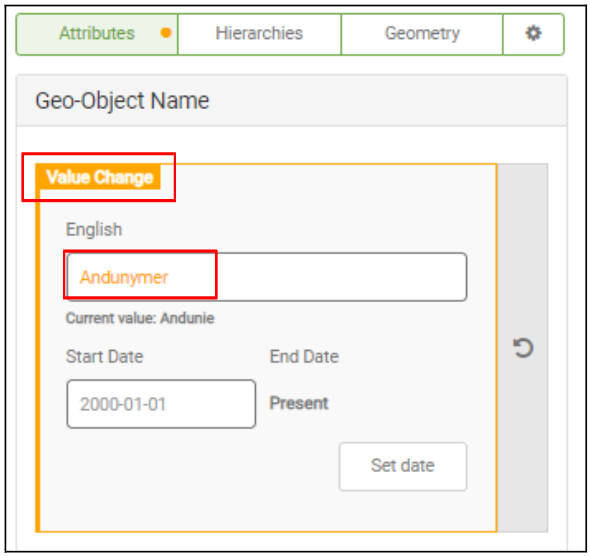
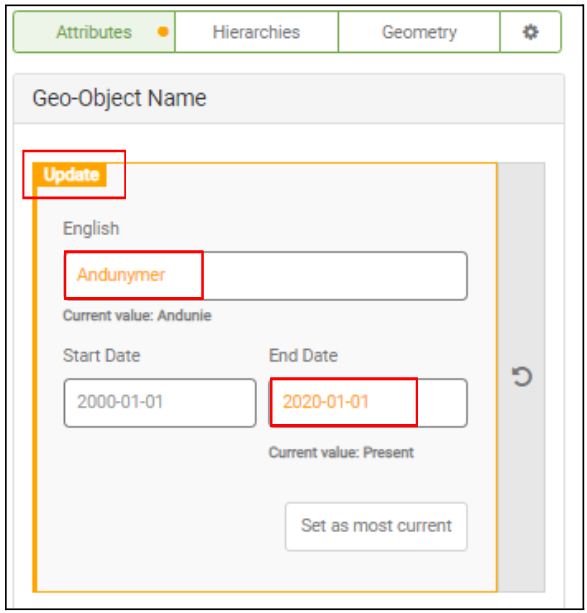
3. Make your changes. Each value has a start and end date, and you can click **New instance** to add a value for a new period. Changed tabs are marked with an orange dot, changed values turn orange, and each change is labelled:
   * **Value Change:** only the value changed.

     <figure><img src="https://3732932512-files.gitbook.io/~/files/v0/b/gitbook-x-prod.appspot.com/o/spaces%2F9giVyCrmTxAs33YrSRbJ%2Fuploads%2FrO1qTz1cgNv7Elrq7BI4%2Fimage.png?alt=media&amp;token=d093ba8f-54f3-490e-9f87-dd6e170bc87d" alt=""><figcaption></figcaption></figure>
   * **Time Change:** only the dates changed.

     <figure><img src="https://3732932512-files.gitbook.io/~/files/v0/b/gitbook-x-prod.appspot.com/o/spaces%2F9giVyCrmTxAs33YrSRbJ%2Fuploads%2FJKKF0u5ExqQzVcakuA9O%2Fimage.png?alt=media&amp;token=d733128a-cfcc-4961-91d6-1014bd2e6a43" alt=""><figcaption></figcaption></figure>
   * **Update:** both the value and the dates changed.

     <figure><img src="https://3732932512-files.gitbook.io/~/files/v0/b/gitbook-x-prod.appspot.com/o/spaces%2F9giVyCrmTxAs33YrSRbJ%2Fuploads%2FjI0CEaMWSOtAN0Vtxfmg%2Fimage.png?alt=media&amp;token=8a6b044a-67e2-4a12-89ab-60114e380d05" alt=""><figcaption></figcaption></figure>
4. To undo the changes in a tab, click the revert arrow.

   <figure><img src="https://3732932512-files.gitbook.io/~/files/v0/b/gitbook-x-prod.appspot.com/o/spaces%2F9giVyCrmTxAs33YrSRbJ%2Fuploads%2FlWjwSETLQM8dlWB8ZVm2%2Fimage.png?alt=media&amp;token=ca1ea320-d285-4420-af8c-7e40560da91e" alt=""><figcaption></figcaption></figure>
5. On the **Geometry** tab, if geometry editing is enabled for the Geo-Object Type, click **Edit Geometry** to draw or change the shape on the map, and **Stop editing** when you're done. For points, you can type the **Latitude** and **Longitude**. **Show original** displays the geometry before your changes.
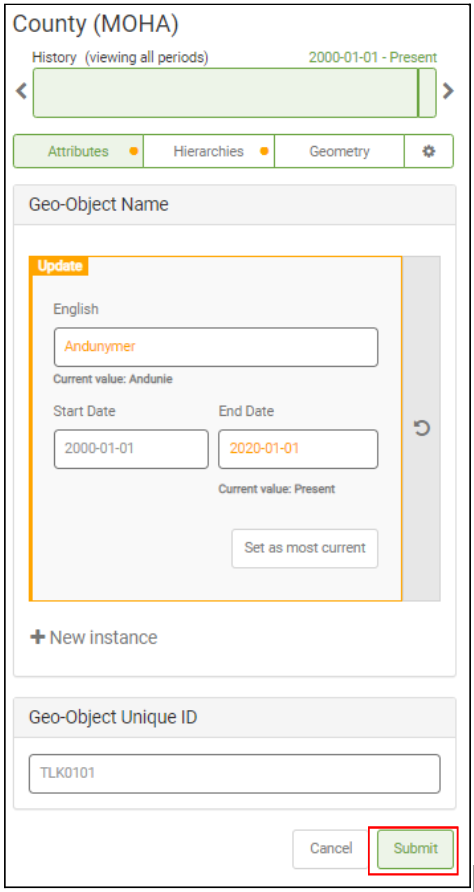
6. Click **Submit**. If you're a Registry Contributor, enter a **Reason** and click **Submit A Change Request** instead.

   <figure><img src="https://3732932512-files.gitbook.io/~/files/v0/b/gitbook-x-prod.appspot.com/o/spaces%2F9giVyCrmTxAs33YrSRbJ%2Fuploads%2FqydpVFBH06AoAsAXHvAr%2Fimage.png?alt=media&amp;token=00174301-6f4b-4c12-9348-357d50de1d89" alt=""><figcaption></figcaption></figure>
7. A message confirms the edit was submitted. For a change request, click **View change request** to see it, or **Ok**.

If you leave while editing, a message warns that your changes will be lost.