> For the complete documentation index, see [llms.txt](https://docs.geoprismregistry.com/llms.txt). Markdown versions of documentation pages are available by appending `.md` to page URLs; this page is available as [Markdown](https://docs.geoprismregistry.com/version/v2.0.0/configure/geo-objects-and-hierarchies/hierarchies/add-a-hierarchy.md).

# Adding a hierarchy

{% hint style="info" %}
Registry Administrators can add a hierarchy for the organization they are a part of.
{% endhint %}

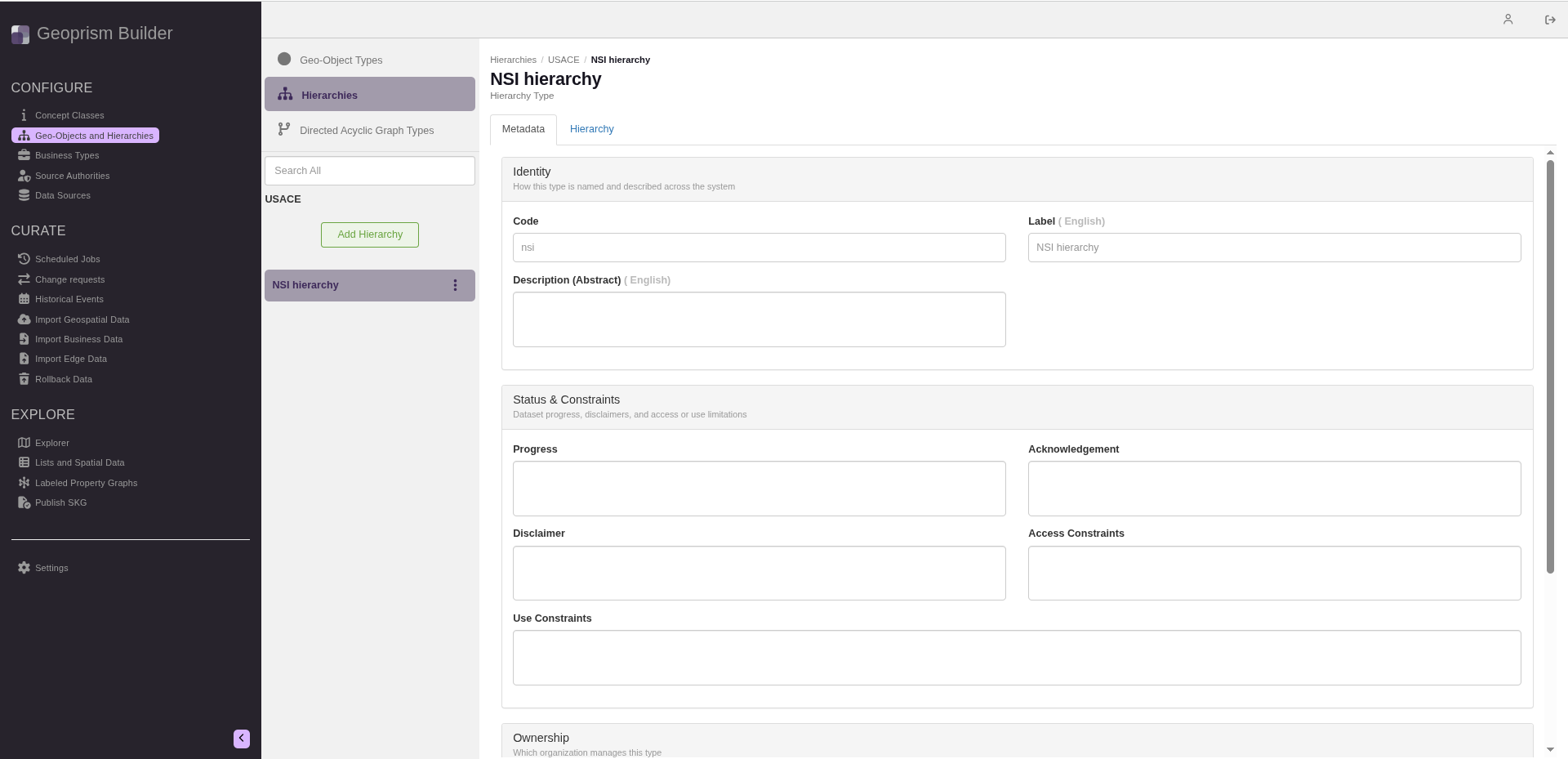
1. Navigate to the **Geo-Objects and Hierarchies** page from the sidebar and select **Hierarchies** at the top of the list.

   <figure><img src="https://3732932512-files.gitbook.io/~/files/v0/b/gitbook-x-prod.appspot.com/o/spaces%2F9giVyCrmTxAs33YrSRbJ%2Fuploads%2FCrOcn3ecxBuG2TCrTty3%2Fimage.png?alt=media&amp;token=e7c9580f-2987-431c-b79d-f5e9ce389def" alt=""><figcaption></figcaption></figure>
2. Click **Add Hierarchy** under your organization.

   <figure><img src="https://3732932512-files.gitbook.io/~/files/v0/b/gitbook-x-prod.appspot.com/o/spaces%2F9giVyCrmTxAs33YrSRbJ%2Fuploads%2F0wLyoLkAbg3c1PNFEMu7%2Fimage.png?alt=media&amp;token=06ea84d6-321c-4c7f-b2d2-7d41c13be2a3" alt=""><figcaption></figcaption></figure>
3. Fill out the form:

   | Field                  | Description                                                                                                                                                 | Required |
   | ---------------------- | ----------------------------------------------------------------------------------------------------------------------------------------------------------- | -------- |
   | Code                   | The unique human-readable identifier of the hierarchy. It can't be changed later.                                                                           | Required |
   | Label                  | The display label, with one field per installed locale. The default locale is required.                                                                     | Required |
   | Description (Abstract) | A description of the hierarchy, with one field per installed locale.                                                                                        |          |
   | Progress               | A description of the progress so far in creating and curating the data for this hierarchy.                                                                  |          |
   | Acknowledgement        | Acknowledgements relevant to the hierarchy.                                                                                                                 |          |
   | Disclaimer             | Any disclaimers relevant to the hierarchy.                                                                                                                  |          |
   | Access Constraints     | Access constraints relevant to the hierarchy.                                                                                                               |          |
   | Use Constraints        | Use constraints relevant to the hierarchy.                                                                                                                  |          |
   | Organization           | The organization the hierarchy belongs to. If you're a Registry Administrator for more than one organization, you can choose it. It can't be changed later. |          |
   | Contact name           | The full name of the person responsible for managing this hierarchy.                                                                                        |          |
   | Telephone number       | The telephone number of that person.                                                                                                                        |          |
   | Email address          | The email address of that person.                                                                                                                           |          |

   The form has no save button. The hierarchy is saved when you close the form.
4. Click **Close**.

   <figure><img src="https://3732932512-files.gitbook.io/~/files/v0/b/gitbook-x-prod.appspot.com/o/spaces%2F9giVyCrmTxAs33YrSRbJ%2Fuploads%2F3WrEcVsJlE85UWTf268z%2Fimage.png?alt=media&amp;token=b490d008-9d56-45d1-8640-9f85f86a42af" alt=""><figcaption></figcaption></figure>
5. A message says **You have unsaved changes**. Click **Save changes and close**.

   <figure><img src="https://3732932512-files.gitbook.io/~/files/v0/b/gitbook-x-prod.appspot.com/o/spaces%2F9giVyCrmTxAs33YrSRbJ%2Fuploads%2FKzmpsooss0Tcmkg31SHr%2Fimage.png?alt=media&amp;token=e09ad1be-3c34-45cc-a646-83464d46653e" alt=""><figcaption></figcaption></figure>
6. Add Geo-Object Types to the hierarchy. See [Managing the content of the hierarchy](/version/v2.0.0/configure/geo-objects-and-hierarchies/hierarchies/manage-the-content-of-the-hierarchy.md).