> For the complete documentation index, see [llms.txt](https://docs.geoprismregistry.com/llms.txt). Markdown versions of documentation pages are available by appending `.md` to page URLs; this page is available as [Markdown](https://docs.geoprismregistry.com/version/v2.0.0/configure/concepts/concept-sets.md).
# Concept Sets
See [Concepts](/version/v2.0.0/configure/concepts.md) for a definition of Concept and general overview.
A Concept Set defines the allowed values for a Geo-Object Type's classification, drawn from your imported Concepts. Each Concept Set uses one Concept Class and one Concept Edge Type.
There are two types of concept sets:
* Enumeration
* Taxonomy
Enumerations define a flat list of data. This is typically how classification options would be defined to restrict the classification options for a Geo-Object Type.
Taxonomies define a hierarchical set of data for when classifications of information are nested in a larger tree of taxonomies. Larger taxonomies may define different levels of data classifications (e.g. residential is on one level with single family and multi-family residential being below that). This enables the ability to select a part of a taxonomy hierarchy that is most relevant to a Geo-Object Type while keeping the over all taxonomic data in one place.
Example:
If a taxonomy Concept Edge Type and your imported Concepts and their relationships define the types of human-built physical structures (e.g. building, dam, etc.), a Concept Set can package them together. Assign that Concept Set to a Geo-Object Type when you create it. During import, each Geo-Object's classification must then be one of those physical structure types. A classification value of "Dam" will be allowed because it's a type of built physical structure as defined by the taxonomy.
## Where Concept Sets are used
You select a Concept Set when [creating a Geo-Object Type](/version/v2.0.0/configure/geo-objects-and-hierarchies/geographic-object-types-outside-a-group/add-a-geographic-object-type.md). This adds an attribute called **classification** to the type. The Concept Set can't be added, changed or removed after the Geo-Object Type is created.
When you import Geo-Object data, the **classification** field appears on the screen where you match the columns in your file to system fields. Select the column that holds each Geo-Object's classification. Its values must be Concepts in the Concept Set.
{% hint style="warning" %}
Prerequisite: Your Concepts and the relationships between them must be imported (see [Import Business Data](/version/v2.0.0/curate/import-business-data.md) and [Import Edge Data](/version/v2.0.0/curate/import-edge-data.md)) before you create a Geo-Object Type that uses the Concept Set, and before you import Geo-Object data to that type.
{% endhint %}
## Creating a Concept Set
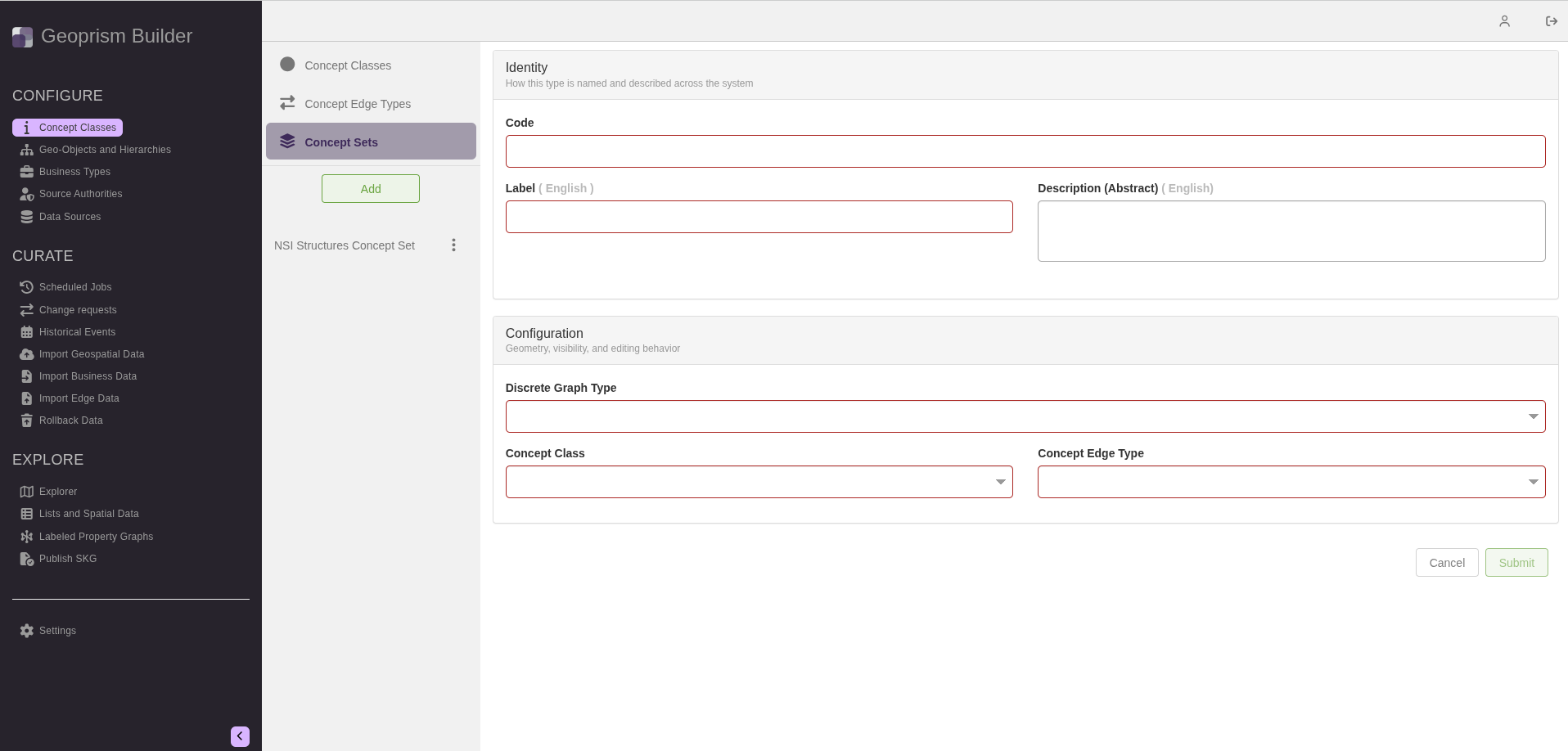
1. Navigate to the **Concept Classes** page from the sidebar. The page has three sections, **Concept Classes**, **Concept Edge Types** and **Concept Sets**, which you choose at the top of the list. Select **Concept Sets**.
2. Click **Add**.
3. Fill out the form. None of the fields in the **Configuration** section can be changed after the Concept Set is created.
| Field | Description | Required |
| ---------------------- | ---------------------------------------------------------------------------------------------------------------------------------------------------------------------------------------------------------------------------- | -------- |
| Code | The unique identifier of the Concept Set. It can't be changed later. | Required |
| Label | The display label, with one field per installed locale. | Required |
| Description (Abstract) | A description, with one field per installed locale. | |
| Discrete Graph Type |
The structure of the allowed values:
Enumeration: a flat list of options.
Taxonomy: a branch of a larger taxonomy, chosen with Root Term.
| Required |
| Concept Class | The Concept Class the values come from. | Required |
| Concept Edge Type | The Concept Edge Type that relates the Concepts. | Required |
| Root Term | For a taxonomy, the Concept at the top of the branch you want. That Concept and every Concept below it are valid values. Start typing to search for it. | |
4. Click **Submit**.
To change a Concept Set's label or description, click the three-dot menu next to it and select **Edit**. To remove it, select **Delete**.